Home Screen
The Home screen is used to view information regarding service hot leads, upcoming service appointments, data for ongoing sales campaigns, and progress toward meeting monthly sales and lead generation goals.

|
To access the Home screen, click the |
 (Home) icon or click the
  (XtreamService) logo at the top left of any screen.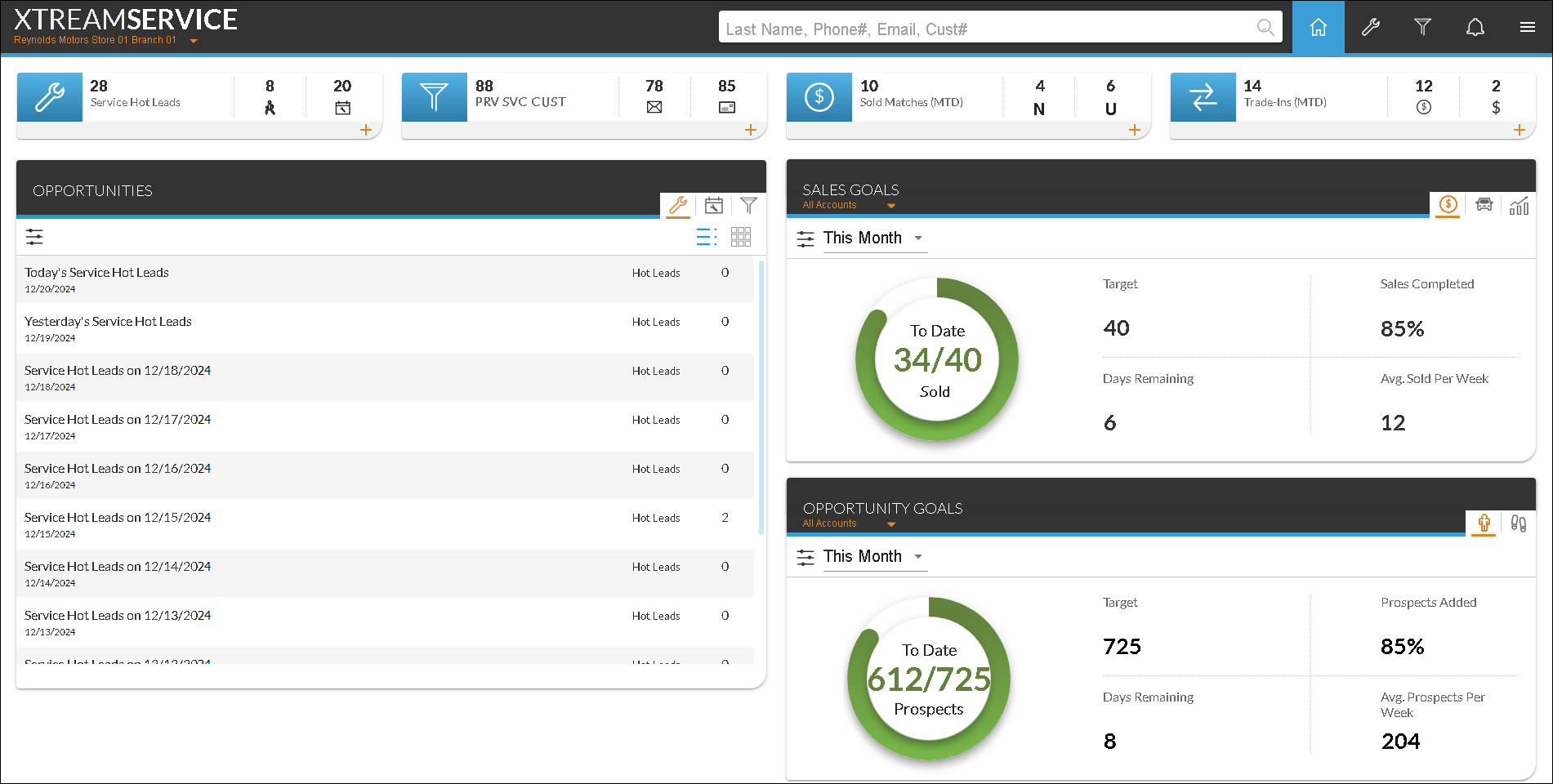
Various Performance Indicators display at the top of the Home screen. These performance indicators are used to review analytic information for leads and vehicle sales. These indicators can be expanded using the  (Expand) icon to display additional information. The following performance indicators display when the Home screen is accessed.
-
Service Hot Leads. The Service Hot Leads performance indicator is used to review the number of leads generated for service appointments and walk-ins for the current day. This information is updated in real time.
-
Active Campaign. The Active Campaign performance indicator is used to review the number of customers that have been contacted by Email message or by direct mail for the most recent sales campaign. This information is updated in real time.
-
Sold Matches. The Sold Matches performance indicator is used to review the number of vehicles that were sold as a result of an XtreamService lead for the current month to date. This information is updated overnight to reflect sales made each day.
-
Trade-Ins. The Trade-Ins performance indicator is used to review the number of trade-in vehicles purchased from XtreamService lead customers that were then sold by dealership personnel for the current month to date. This information is updated overnight to reflect sales made each day.
In addition, the following panels are available on the Home screen.
-
Opportunities panel. The Opportunities panel is used to view information about recent service hot leads, upcoming service appointments, and sales campaigns, such as the total number of leads and the percentage of leads that resulted in vehicle purchases. Select a row in this section to display the Service Hot Leads Details panel, the Upcoming Appointments Details panel, or the Campaign Details panel, based on the row selected, where additional information about the service or campaign leads can be viewed.
-
Sales Goals panel. The Sales Goals panel is used to view the progress toward meeting vehicle sales goals over various time frames, such as the current day or the current month. Sales goals are dealer-defined goals regarding the number of vehicles sold as a result of XtreamService leads.
-
Opportunity Goals panel. The Opportunity Goals panel is used to review the progress toward meeting opportunity goals. Opportunity goals are dealer-defined goals regarding the number of prospects to be added or contacted during a selected time period.
Click here for a list of products that may be mentioned in this help file.